VR Productivity finally almost surpasses physical displays
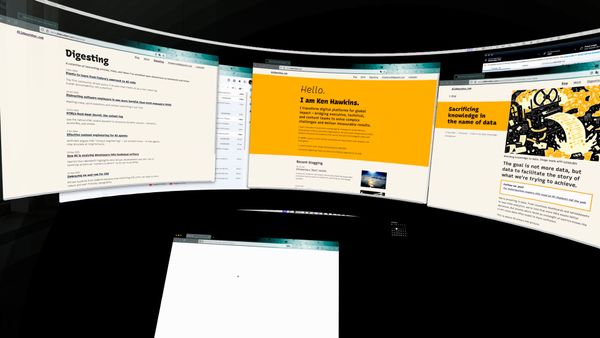
After years of trying, I found a work VR work setup that works real: Quest 3, Immersed on Mac, and a single ultra-wide screen.
I've wanted the same thing from VR for years: virtual big screens strapped to my head. Not gaming, not social spaces — just an excess of screen real estate and the freedom to sit however I want without fussing with monitor height. After trying various headsets and apps across Windows, Linux, and now Mac, I finally have a setup that works well enough to use daily.
tl;dr#
- Quest 3 + Immersed on Mac works better than other combinations I've tried
- Resolution and settings that give the best productivity experience
- The unexpected ergonomic freedom of a screen that follows your posture
- Trade-offs and quirks, plus what's still missing for that serene workspace feeling
A quest for VR productivity#
For years I've eyed options. The Immersed Visor looked promising but still hasn't shipped. I picked up Rokid AR glasses — lightweight, unobtrusive — but the display just isn't big enough or sharp enough for a full workspace, or to qualify my "big screen strapped to face" requirement. It's fine for a movie on a plane, not for staring at code all day.
In early 2025, Quest 3 seemed like the best hope, but the experience was too temperamental on Windows and Linux — apps would crash, connections would drop, and I'd spend more time troubleshooting than working.
When I switched to back to the Mac, something clicked. Immersed was more stable. Still not perfect, but stable enough that I could actually get work done instead of fighting with the software.
What finally worked#
Here's the setup that got me to 90% happy:
Hardware:
- Meta Quest 3
- Bobo VR S3 Pro head strap (in "halo" mode)
- Single USB-C cable from Mac to headset (power + data)
Software:
- Immersed on macOS 15.5
- Single virtual display: 5120 × 1440 pixels
- Black desktop background and black Immersed environment
The single-cable setup is key. With the Quest 3, one USB-C cable handles both power and data. Compare that to Vision Pro, where you'd need the data cable plus a separate battery pack cable dangling around.
One underrated Immersed advantage: it connects directly to your Mac over the local network without tunneling through an external server. Most VR desktop apps require a connection to their cloud service to broker the local link, which gets blocked on restrictive corporate or institutional networks. Immersed just works on the local network, making it one of the few options viable in those environments.
The display configuration#
I settled on 5120 × 1440 after experimenting. Immersed maxes out at 5760 × 1200, but the slightly less wide aspect ratio of 5120 × 1440 feels more balanced. I'd prefer about 30% more vertical space, but recent versions of Immersed on Mac don't offer realistic custom screen sizes.
I used to disable the MacBook's built-in display entirely, but I've since changed my approach:
- MacBook screen: Left on, appears above my virtual screen in Immersed
- External monitor: Kept connected on the right, unused in VR
- VR environment: Set to black, along with the desktop background
I don't use either physical screen while in VR, but leaving them connected makes it trivial to switch between VR and desk mode — just take off the headset and everything's already there. No reconnecting displays, no window shuffling.
There's an ergonomic bonus here too. With physical monitors, you're locked into whatever height and angle the stand allows. With a virtual screen, you can recline in your chair, shift your posture, lean back — and the screen stays exactly where you need it. No more hunching forward to see a monitor that's slightly too low.
Head strap setup matters#
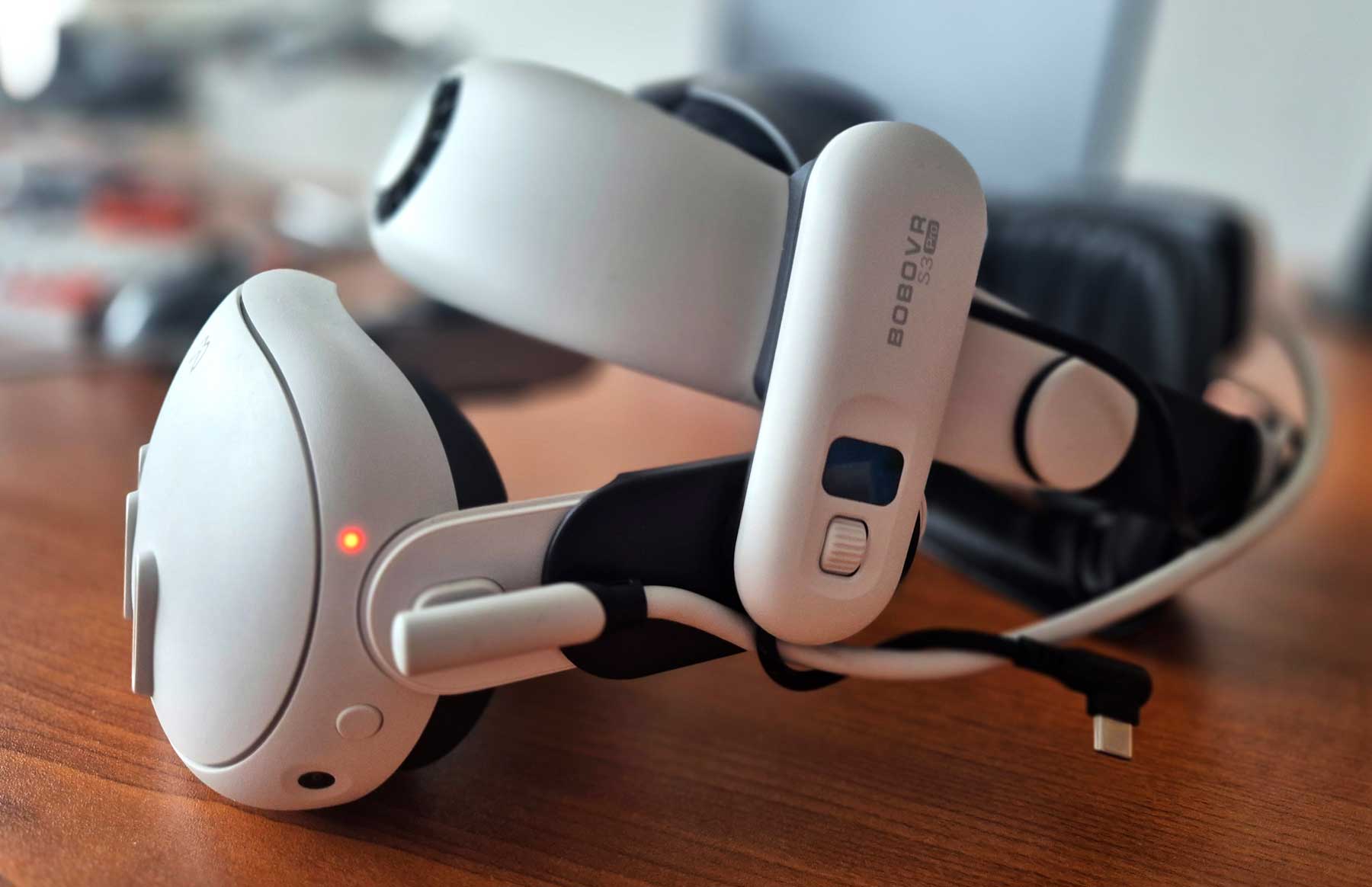
The Bobo VR S3 Pro in halo mode distributes weight well. I keep the battery attached even though I don't use it — the extra weight counterbalances the headset so it doesn't slide down toward my nose, and I don't have to over-tighten the strap.
I initially removed the face padding to run it in visor mode — being able to see my keyboard and desk peripherally helps with long sessions. But I've since added it back. Even though I don't love the feel of foam on my face, it keeps the headset aligned better. Without it, the display drifts slightly as the headset shifts, and you end up micro-adjusting more than you'd like.
The real friction points#
This setup works, but it's not seamless. Some pain points are technical, others are social.
Audio flakiness: Immersed's audio handling is temperamental. It often stops working when reconnecting the headset. I've learned to just restart the app when this happens.
Fiddly experience: This feels like a Linux-circa-2010 experience — functional but requiring occasional manual intervention. It's a leap from the "just works" polish you'd expect from something like Vision Pro.
Resolution limitations: While 5120 × 1440 is plenty of horizontal space, I'd love more vertical pixels. Unfortunately, Immersed doesn't currently support truly custom resolutions on recent macOS versions.
The webcam problem: This is a bigger deal than I expected. You can't really share your real face on video calls with a giant device strapped to your head. Immersed offers VR avatar integration, but for many colleagues, this is even more creepy than showing your webcam with the Quest on your face. It's a very real chafing point for collaborative work.
Reduced mobility: It's harder to step away from your desk or quickly grab a notepad. You're more in the VR space than the real world. That mental shift has friction — you can't just glance at your phone or look out the window without taking the headset off.
What's missing#
Immersed is genuinely the best VR productivity app I've tried. The virtual screen quality is good, the Mac integration works, and the core experience is solid. But it still feels like productivity software, not a place you want to be.
There's no sense of serenity. The environments are functional but not beautiful. The UI is utilitarian. When something glitches — and it will — you're reminded you're wrestling with software rather than just working. Compare that to the promise of VR: you could be in a mountain cabin, a minimalist studio, a quiet library. Instead, you're in a black void with a floating rectangle, which works but doesn't inspire.
The gap between "this functions" and "this feels great" is where VR productivity still falls short. I want to forget I'm wearing a headset and just be somewhere calm with my work. We're not there yet.
The Vision Pro question#
I've considered Vision Pro. Beyond the technical specs, there's another angle: aesthetics and social acceptability.
Vision Pro looks stylish. It's a fashion and status statement, not a weird cybernerd tech look. That might sound shallow, but it matters when you're on video calls or working in shared spaces. The Quest 3 — even in visor mode — screams "I'm deep in VR land." Vision Pro whispers "I'm using premium spatial computing tools."
Whether that's worth the price premium is another question. The technical reasons I haven't switched:
- Cost: It's significantly more expensive than Quest 3 + accessories
- Cable situation: You'd need both a data cable and a battery pack cable, making it less elegant than Quest 3's single-cable approach
- Uncertainty: For pure productivity work (no hand tracking, no spatial apps), I'm not convinced the experience would be meaningfully better
I'd still love to try a Vision Pro for a few days to see if the seamlessness justifies the cost. But for now, Quest 3 delivers enough value at a fraction of the price.
The Steam Frame wildcard#
Valve's upcoming Steam Frame headset is one I'm watching. A standalone headset running SteamOS with wireless PC streaming — similar to Quest 3's approach but with Valve's ecosystem. Expected in early 2026 at around $1,200, it's likely to sit between Quest 3 and Vision Pro in price, but exceed both in flexibility.
For productivity, the interesting question is whether someone builds a polished workspace app for it. Valve's focus is gaming, but SteamOS is Linux-based, which could open doors for creative productivity tools. It's speculative, but if the hardware is good and the wireless streaming is solid, it could become a compelling option for those of us who want more than what Immersed currently offers.
Happiness level: 90%#
This is the best VR productivity setup I've found. It's stable enough for daily work, comfortable enough for multi-hour sessions, and flexible enough to tweak when needed.
The remaining 10%? That's audio flakiness, occasional connection hiccups, wishing for more vertical pixels, and the awkwardness of video calls.
But those are minor compared to how well this setup lets me focus and how good it feels to sit. There's something about working in a black void with just your screen and your thoughts — no desk clutter, no peripheral distractions, no visual noise from the room around you.
I can recline, shift positions, sit however my back needs that day, and the screen is always perfectly placed. And when I'm done, I unplug one cable and the whole office fits in a bag.
If you've been waiting for VR productivity to "just work," it's not quite there yet. But if you're willing to tolerate some fiddliness and you work mostly solo, Quest 3 + Immersed on Mac gets you most of the way.
 people found this useful