Collaborate on any webpage with a bookmarklet and URL state
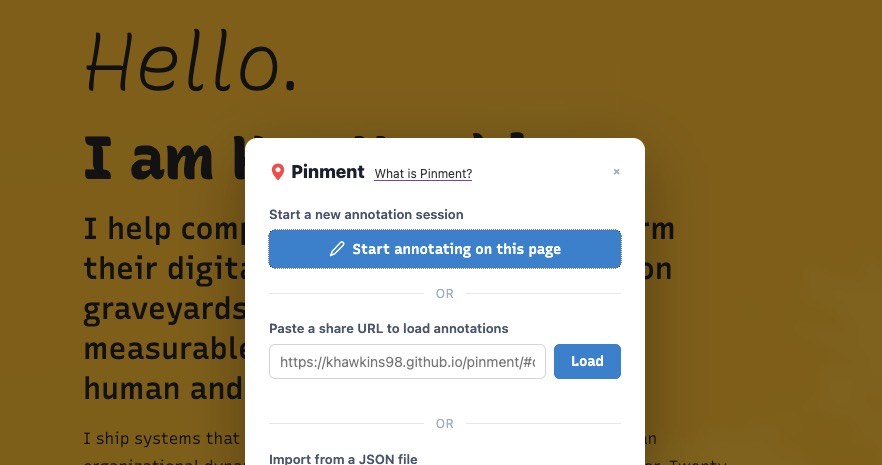
Pin comments on any live webpage and share them as a URL with no account and zero cost. As in free.
I regularly send webpages to colleagues for feedback — staging sites, published posts, someone else's work I want a second opinion on. The ask is always simple: look at this page and tell me what you'd change.
Tools for this are not easy and low-friction. Every platform I found wants accounts on both sides. I don't want to sign up for a SaaS tool, and I definitely don't want to make a colleague create an account just to tell me a heading is wrong. Screenshots go stale. Slack messages turn into "the third paragraph under the hero, on the left side, below the thing."
I wanted something with no friction: point at things on a live page, leave comments, hand someone a link. With AI-assisted coding, I put together Pinment in a couple of hours — a bookmarklet that does exactly that. (The name is "pin" plus "comment." A naming decision I already regret.)
How it works#
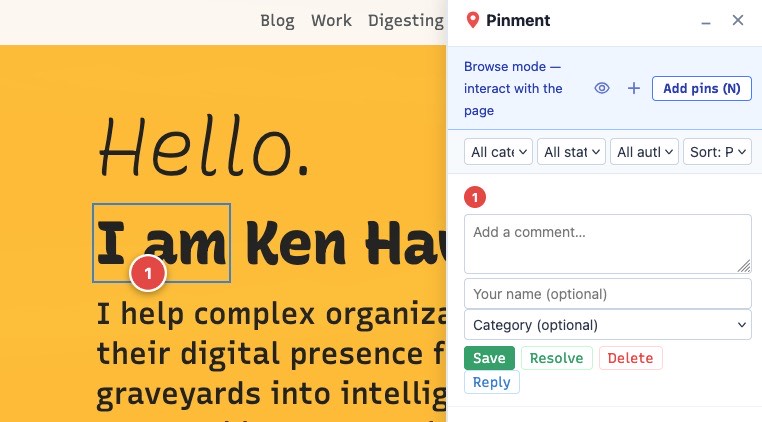
Grab the bookmarklet, navigate to any page — published, staging, localhost, behind auth — and click it. A panel appears.
Click anywhere to drop a numbered pin. Add a comment. Drop more pins. Hit Share. Pinment compresses everything into the URL fragment.
The recipient opens the link, clicks the bookmarklet, and sees the full annotated view reconstructed. No server, no login. The URL carries the entire review session.
URL as the entire state layer#
This extends the URL-as-state idea I've mentioned before. With Pinment URL fragment holds the entire review session.
A review with 15–20 annotations fits under 4 KB. The practical ceiling is around 50 pins before browsers complain about URL length.
Pins that follow the DOM#
Screenshots anchor to pixel coordinates. Resize the window and they're meaningless. Pinment anchors to the DOM instead. It generates CSS selectors for each pinned element, preferring stable hooks (IDs, data-testid) over fragile positional chains. Pins reposition on resize.
If the DOM changes and a selector can't resolve, Pinment falls back to the original coordinates with a warning badge.
Bookmarklet, not extension#
A browser extension requires installation, review queues, and separate builds per browser. A bookmarklet is a bookmark. Drag it to the bar, done.
The bookmark itself is a tiny loader (~200 characters) that fetches the full script from the host. Updates ship without reinstalling anything.
What you can do with it
Beyond placing pins and sharing URLs, Pinment handles a few things that come up in real review workflows:
- Thread replies — reply to any pin to start a back-and-forth
- Categories — label pins as text, layout, missing content, or question
- Resolved status — mark issues as resolved without deleting the pin
- Filter and sort — filter by category, status, or author when the pin count grows
- JSON import/export — save a session to a file and reload it later, useful for reviews that span multiple days or exceed URL length limits
- Element highlighting — hover a pin or its panel entry and the anchored DOM element outlines on the page
- Drag to reposition — move pins after placing them without starting over
- Keyboard shortcuts — Escape for browse mode, N for pin mode, arrows to navigate between pins
Standing on shoulders
I borrowed ideas from several tools:
- Hypothesis proved open web annotation is a viable concept, though it's built around text selection and a centralized backend
- Marker.io and Pastel showed the product need for visual webpage review, but both require accounts, cost money, and capture screenshots rather than annotating live pages
- Inkash demonstrated the bookmarklet annotation approach
- Buffertab showed that lz-string compression can fit useful state into URL fragments without a backend
- Ahmad El-Alfy's writing on URL-as-state shaped how I think about what belongs in a URL
None of them did everything I wanted. Hypothesis selects text, not visual elements. Marker.io and Pastel capture screenshots, not live pages. Buffertab proved the URL compression trick but isn't built for annotation. So I took the parts that worked.
Try it#
Pinment is on GitHub and the bookmarklet hub is live. Drag the bookmarklet to your bar and try it on any page. If a selector breaks, a pin lands in the wrong spot, or you hit the URL length ceiling sooner than expected — file an issue.
It's not as bulletproof as marking up a PDF, but it's lighter, faster to set up, and nobody has to create an account to collaborate.
A browser extension would be more reliable on pages with strict Content Security Policy, and I may build one eventually — but then everyone has to install it. The bookmarklet keeps the barrier at zero.
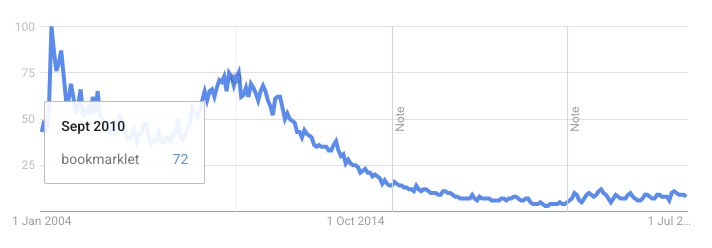
If nothing else, it's a chance to rediscover bookmarklets. They're a useful bit of web tech that's gone unloved since peaking around 2011.
Related posts:
- URLs are the state management you should use — the URL-as-state philosophy behind Pinment's sharing model
- Feedback buttons without JavaScript, using a 1990s web pattern — another project using URL fragments as state
- PDF-A-go-slim: a browser-based PDF optimizer — same build season, same "do it in the browser" ethos
- Two-way communication beats another shipped feature — the tension between shipping and landing
 people found this useful