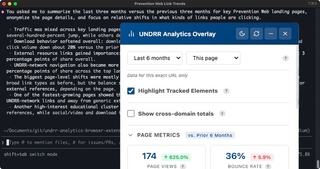
Content teams shouldn't have to leave the page to learn how it performs, and neither should AI agents.
Context | Self-service | Agent-queryable
Web analytics are most useful alongside the context of the pages you are reasoning about. Using AI agents to help also suffers as humans usually manually hand off data.
To help myself and the team, I built a Chromium extension that puts GA4 metrics on UNDRR pages as an overlay, and extended it with a local MCP server so humans can have agents query the same data through the Chromium extension's same authenticated session.
The overlay and the MCP bridge are the same tool wearing two faces: same auth, same config file, same measurement model. That is why neither had to be rebuilt to serve the other. This is the story of both pieces and why they belong together.
These are the three web pages I am responsible for. Can you tell me what links people are not clicking on?
Those sorts of questions used to take an age to answer, but now we have quicker, better and more understandable answers.
What was the actual problem?#
Context switching to Looker Studio is where curiosity dies. For editors wondering whether the policy page they just updated is getting traction, a five-step dashboard drill is slow enough that most of the time they skip it. The question gets answered only when the quarterly report lands, which is the wrong feedback loop for editorial decisions. We spent more time training editors on the tool than understanding the data.
UNDRR's analytics model is not generic. Twenty-two hostnames feed one GA4 property, downloads derive from URL patterns containing /media/, engagement is tagged by page region (main, header, footer, feedback widget), and referrers are classified into eighteen strategic buckets before query time. Off-the-shelf analytics tools either ignore that model or flatten it.
How did I approach this?#
Overlay first, where the work happens. The extension is a Manifest V3 Chromium extension. It authenticates through the Chrome Identity API, so there are no extra credentials. On any UNDRR page it can surface views, sessions, engagement rate, average duration, and a year-over-year comparison with an interactive daily chart. Tracked links and downloads get color-coded badges on the page itself; regions get rollups so editors can see which part of a page is actually doing the work.
Bridge second, on an auth boundary that already existed. The MCP server runs on a localhost port and talks to an offscreen document inside the extension over a persistent WebSocket. That offscreen document owns the OAuth session, so the MCP server never sees or stores a token. From the agent's side, fourteen tools are exposed: tactical ones (query_top_content, query_downloads, query_traffic_sources, query_geographic_reach, query_region_events), strategic composites (domain_overview, annual_report_extract), and a raw GA4 escape hatch (run_raw_ga4_query) for questions the composites do not anticipate.
One source of truth, shared three ways. domains.json holds the twenty-two hostnames, their measurement IDs, and the referrer bucket classifiers. The extension's content script, its popup, and the MCP server all read the same file, so there is no config drift between what editors see in the overlay and what an agent sees through MCP.
What were the outcomes?#
Context at the point of editing. Editors can now see how a page is performing while they are editing it. The question "is this working?" has a three-second answer instead of a five-step Looker Studio drill; editorial decisions close the loop on the same day rather than the next quarter.
Agent-speed analysis. "Extract the annual report for 2025" is a single agent turn instead of roughly a forty-click dashboard walk. Parallel GA4 query batching inside annual_report_extract roughly halves the wall-clock time on multi-section reports, which matters when a report spans a dozen sections.
One credential, not two. The agent reuses the overlay's OAuth session, so nobody is maintaining a second service account or rotating a separate key. For a small team inside a UN organisation, that is the difference between a tool that gets adopted and one that quietly stops being used.
Why did this work?#
A tailored solution made sense because the measurement model is non-generic. A general-purpose analytics MCP would expose GA4 as GA4. What editors and analysts actually need is GA4 shaped like UNDRR's referrer buckets, regions, and content types. Keeping the domain logic in domains.json rather than in prompts means every agent gets the same context for free.
The MCP was not a rewrite. It was a thin wrapper on an auth boundary that already existed. The extension already had an OAuth session, an offscreen document, and a query layer; MCP just made them addressable from outside the browser. Most of the hard decisions were security decisions: single-property lock, sender validation, passive failure modes.
The one thing that nearly broke it. A single bad Zod schema (valid in v3, rejected in v4) made tools/list throw at registration, and that error is global: all fourteen tools disappeared from the agent at once. A stdio smoke test calling tools/list as the first build step now catches this class of failure; without it, the MCP server would have shipped advertising capabilities it could not deliver.
What's next, and why this matters beyond UNDRR#
Self-service analytics inside the page is a familiar idea. Agent-queryable analytics that reuses an existing auth session is newer. This extension is one instance of the pattern I described in Let AI worry about the code, you worry about the work: a coding agent on a real project, primed with your business context. The MCP server is the specific shape that worked here; the shape that works for you might be simpler.
