Converting SVG text to outlines breaks accessibility, search, and translation. SVGOMG-Font embeds a subsetted font instead, in your browser.
Every so often I need to put an SVG with text on a website: an infographic, a diagram, a data visualisation with labels. Each time, I end up staring at the same bad choice.
Option A: Convert the text to outlines. The SVG renders identically everywhere. No font loading, no layout surprises. Done. But now the text is a pile of path data. Screen readers see nothing. Search engines see nothing. Language models see nothing. Translation is impossible.
Option B: Leave the text as text. Clean, accessible, editable. But on any device that doesn't have the font installed, the browser falls back to whatever comes first in the system stack, and your carefully spaced infographic turns into a broken layout that looks like someone used Times New Roman on a web 1.0 site.
I've been choosing Option A for years and feeling bad about it. Despite plenty of searching, nothing combined what I actually wanted: a tool that runs in the browser, doesn't upload anywhere, and is open source. The closest matches were CLIs or a paid cloud service. So I built SVGOMG-Font. Drop the SVG in, get the same file back with the font subsetted to the characters in use and embedded as a base64 data URI.
tl;dr
- Drop an SVG in, get back a self-contained one with the font embedded. Runs entirely in the browser, nothing uploaded.
- Converting SVG text to outlines makes it invisible to assistive tech, search, translation, and LLMs.
- Leaving text as-is fails on devices without the font installed.
- SVGOMG-Font subsets to only the glyphs you actually use, so file sizes stay sensible.
- Works cleanly for general-purpose infographics, diagrams, and posters. Rich text layouts that lean on OpenType features (ligatures, contextual alternates, complex scripts) need a closer look.
Here's an SVG set in Playwrite DE SAS, a connected German school-handwriting script almost no reader will have installed:
The text is still real text: selectable, searchable, translatable. The font travels with the file, so it renders the same wherever the SVG lands.
You can sort of sidestep this if you control the host page: load the font via the page's CSS, and the inline SVG inherits it. But that's another asset to manage, another caching layer, and it only holds while the SVG stays on that page. Once the file has to travel (attached to an email, dropped into someone else's CMS, sent over Slack) the font reference goes dead. Bake the font into the SVG itself, the way a PDF embeds fonts, and it just works wherever the file ends up.
The problem with outlines#
When you tell Illustrator or Figma to "create outlines," it replaces every character with the equivalent vector paths. The rendering is locked in. But you've also just destroyed everything that made the text text:
- Accessibility: screen readers can't read paths. The text is gone from the accessibility tree.
- Search: both on-page (Cmd+F) and crawlers. An SVG infographic full of outlined text is invisible to search engines.
- Translation: auto-translate and localisation tools operate on text nodes. No text nodes, no translation.
- LLMs: if a language model needs to understand what your diagram says, it now has to do OCR or get the content from somewhere else.
- Editability: editing outlined text means going back to the design tool, making the change, re-exporting, re-optimising, re-deploying. Minor corrections become multi-step processes.
There's a file-size argument too. A few hundred outlined characters easily adds tens of kilobytes of path data. Subsetting the font is usually smaller than outlining it.
How it works#
The structural change is small. Before, an @font-face rule points at a remote URL the viewer may never load:
<style>
  @font-face {
    font-family: 'Playwrite DE SAS';
    src: url('https://fonts.example/playwritedesas-regular.woff2');
  }
</style>
<text font-family="Playwrite DE SAS" x="20" y="40">Hello, world</text>
After, the same rule, with the font subsetted and inlined as a data URI:
<style>
  @font-face {
    font-family: 'Playwrite DE SAS';
    src: url('data:font/woff2;base64,d09GMgABAAAA…') format('woff2');
  }
</style>
<text font-family="Playwrite DE SAS" x="20" y="40">Hello, world</text>
That's the whole shape of it. SVGOMG-Font scans your file for @font-face references, fetches each font, subsets it to the glyphs in use, and rewrites the rule. No installation, no account, no upload: it all runs in the browser.
Why browser-only matters#
SVGs with fonts are often used in sensitive contexts: client work, unreleased materials, internal tools. Uploading to a third-party service to fix font rendering is a non-starter in a lot of organisations.
SVGOMG-Font processes everything locally. Nothing leaves your machine. It's a single static page. Foveacast, my browser-only attention-heatmap tool, runs the same way for the same reasons (write-up coming).
Prior art#
To be fair, this isn't entirely new territory. A handful of tools cover the same ground:
- svg-embed-font, Go CLI: base64-embeds the full font.
- svg-buddy, Java CLI: WOFF2 embedding given a local font file.
- svgfontembed, Python CLI: embeds and subsets.
- Vecta.io Nano: browser drag-and-drop SVG compressor that also handles font subsetting and embedding, hosted as a cloud service.
The CLIs share the install gap. Vecta.io Nano is the closest match in spirit (same drop-the-SVG-in workflow) but it's closed-source freemium SaaS, processes your file server-side, and has free-tier limits on file count and size. SVGOMG-Font fills the gap I kept hitting: same drop-in workflow, but open source, fully client-side, no upload, no signup. It also auto-resolves fonts from Google Fonts and Fontsource URLs, and on Chromium can pull from installed system fonts via the Local Font Access API.
The subsetting part#
The naive approach (embed the whole font) works but produces large files. A single Latin-subset woff2 file is roughly 20 to 30 KB, base64-encoded to about 40 KB. Two weights, and you've added 80 KB to your SVG before doing anything else.
SVGOMG-Font subsets to the characters in the SVG's text nodes, plus a Basic Latin safety baseline (U+0020 to U+007E). For a typical infographic with a few hundred unique characters, the subset is usually 5 to 15 KB encoded. Often smaller than outlining the same text.
There's a toggle to skip subsetting, useful when text gets added or replaced after export.
What it handles#
- Fonts referenced via Google Fonts CSS URLs
- Fonts referenced via Fontsource CDN paths
- Cases where the font can't be found automatically: it prompts you to drag the font file onto the relevant row
- Local system fonts on Chromium-based browsers via the Local Font Access API (permission-gated)
- SVGO optimisation (optional, off by default; SVGO's
inlineStylespass removes@font-facerules if you're not careful) - Stripping legacy
<font>/<glyph>blocks that some editors still emit
Where it gets bumpy#
For the bulk of SVG-with-text use cases (infographics, charts, diagrams, posters, headlines exported from Illustrator or Figma) the workflow just works. Where it gets shakier is anything leaning on OpenType machinery or rich text layout:
- CORS-blocked fonts: a font hosted without permissive headers can't be fetched from the browser.
- Variable fonts: subsetting variable fonts is finicky in general. If your SVG depends on a custom axis, test the output before shipping.
- OpenType features: ligatures, contextual alternates, and stylistic sets sometimes reach for glyphs that don't appear in the visible text. The Basic Latin baseline catches most cases; obscure feature-driven glyphs may still drop.
- Complex shaping scripts: Arabic, Devanagari, and similar scripts depend on positional and contextual glyphs. If your SVG uses one, eyeball the output rendering before trusting it.
Try it#
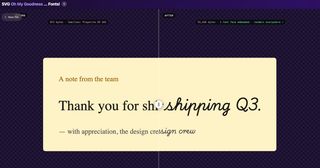
SVGOMG-Font is live on GitHub Pages. Drop your SVG in; if its font references resolve, you'll get a fixed file back in a few seconds.
The source is on GitHub. Bug reports welcome; font name matching in the wild has a long tail.
Related posts:
- Your browser utility wants to be a floating palette (same "do one thing, entirely in the browser" design philosophy)
- Introducing Pinment (another tool from the same season)
- PDF-A-go-slim: a browser-based PDF optimizer (stripping and compressing PDFs, no upload required)
- Foveacast: predicted-attention heatmaps in the browser (another client-side tool, same do-one-thing philosophy; blog post coming)
