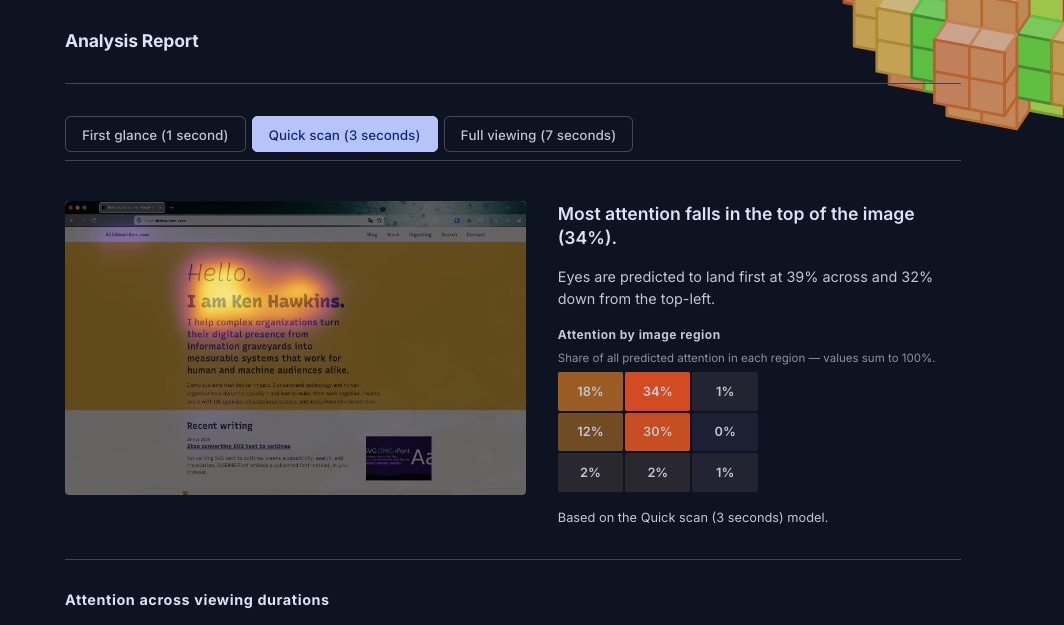
 Own work.
Stop guessing whether users will notice your CTA. Foveacast predicts attention from a screenshot, entirely in your browser, nothing uploaded.
At some point in most design or content reviews you find yourself trying to answer a question you can't answer cleanly: not "is it pretty?" but "will users actually notice the call to action, or are they going to get distracted by the hero image first?"
The honest answer is usually "Based off my knowledge and experience: I think so." That only holds until a stakeholder who disagrees says the same thing.
Foveacast gives both of you something to look at instead. Drop a screenshot of a UI — a web page, an app screen, a mockup — and it produces a predicted attention heatmap: a color overlay showing where a typical user is likely to look, and how that attention evolves over time. Nothing leaves your machine; the model runs entirely in your browser.
tl;dr
- Drop a UI screenshot, get a predicted attention heatmap with fixation sequence, attention zones, and centroid trajectory.
- Three viewing durations: first glance (1 s), quick scan (3 s), full viewing (7 s) — modeled separately, so you can see how attention evolves as users spend more time on the page.
- Runs entirely in your browser. The model (~57 MB per duration) downloads and caches on first use; nothing is ever uploaded.
- Built on MSI-Net fine-tuned on real UI eye-tracking data. Not a natural-scene model that doesn't know what a button is.
- It's a probabilistic estimate, not a user study. The reading-your-results guide in the tool covers what it can and can't tell you.
The analysis report#
The output is a scrollable analysis report.
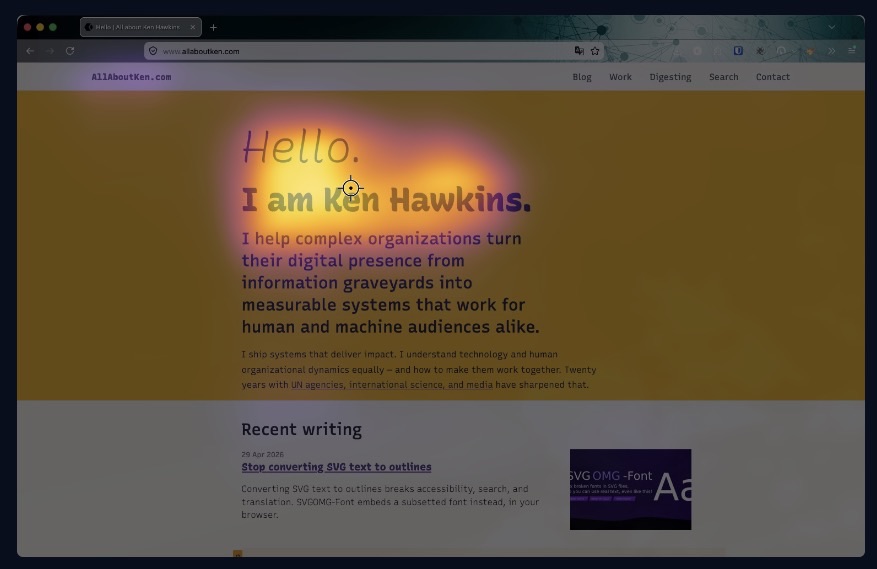
The heatmap overlay uses the inferno colormap: warm colors where attention is predicted to concentrate. Three viewing durations (first glance, quick scan, full viewing) are each backed by a separate model.
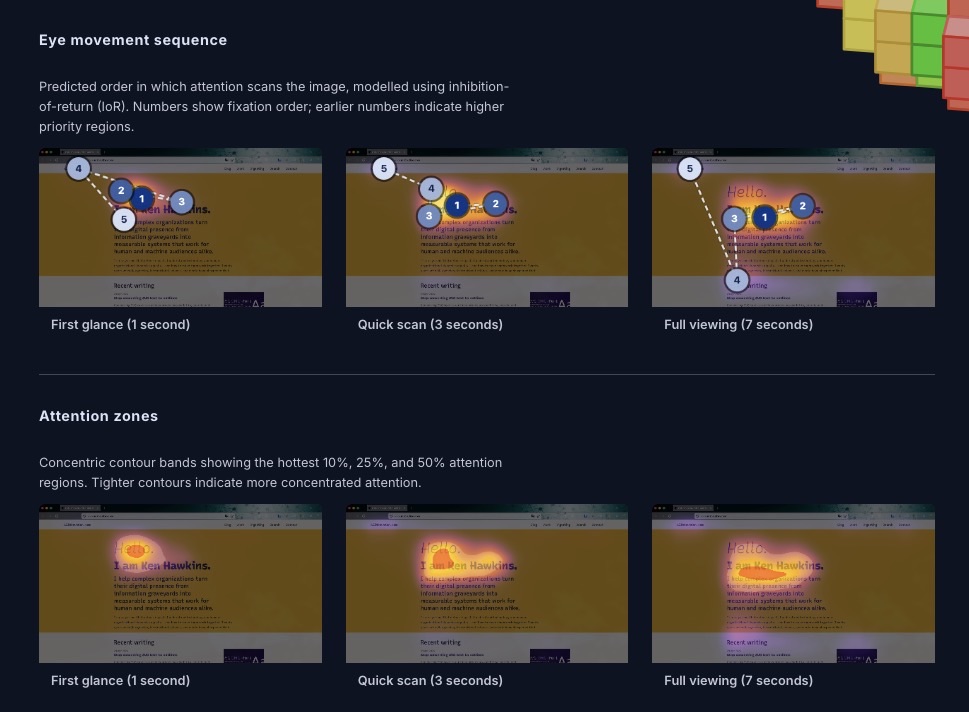
Below the heatmap: a rule-of-thirds grid with attention shares per region, a fixation sequence showing the predicted scan path as numbered dots, attention zones with contour rings at 10%, 25%, and 50% attention mass, and a centroid trajectory tracking where the attention center moves from first glance to sustained viewing.
In a design review, "the CTA doesn't appear until fixation 5, and 42% of initial attention lands on the hero image" is a different kind of conversation than "I think users will miss it." It's not proof. But it's a concrete starting point, and it gets you past the stage where everyone is arguing from intuition.
It's also useful as a self-check before publishing. Before you ship a redesigned landing page and find out three weeks later that the primary action was invisible.
Trained on real UI gaze data, not natural scenes#
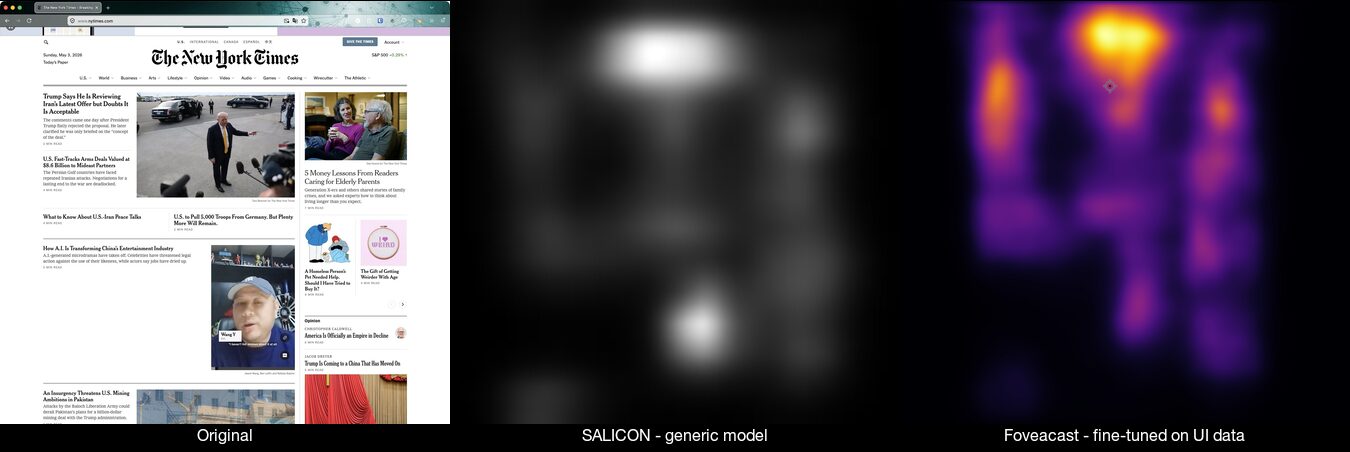
Most open-source saliency models are trained on the SALICON dataset: natural photographs scraped from Flickr. Those models have learned to predict attention on photos of mountains and faces and street scenes. Put a web page in front of them and they produce a diffuse centrality blob. They don't know that "Start free trial" is the most important element on the screen; they see a rectangular region with text and mild contrast and model it accordingly.
The foveacast-training pipeline fine-tuned MSI-Net (Kroner et al. 2020) on UEyes (Jiang et al. 2023). Much credit is due there: Jiang et al. collected 1,980 UI screenshots with real eye-tracking data from 62 participants across desktop, mobile, web, and poster UIs, then published the full dataset on Zenodo under CC BY 4.0. Without that open release, Foveacast wouldn't have been viable to build. Fixations were recorded at 1, 3, and 7 seconds of viewing time, which is why there are three separate models rather than one. The gaze pattern at one second ("where do my eyes go first?") and at seven seconds ("where does sustained attention end up?") are genuinely different questions with different answers.
Fine-tuning on UI content closes the gap. On a held-out test split, the fine-tuned model improves by +43% on correlation coefficient and cuts KL divergence by 44% compared to the stock SALICON-only baseline. The stock model produces diffuse blobs. The fine-tuned model picks up navigation elements, content headings, and interactive controls, matching where real users actually looked.
Limitations: what predicted attention can't tell you#
Foveacast shows a non-dismissible note in the UI that says this is a probabilistic estimate based on population-average gaze patterns. A few things worth keeping in mind:
- It's not measured data. The heatmap is model output, not fixations from real users looking at your specific design.
- Training distribution. UEyes is primarily Western-language desktop and mobile UI, collected prior to the 2023 publication. Right-to-left layouts, dark-mode UIs, and design patterns that weren't common then may produce less reliable estimates.
- Not a click predictor. High predicted attention on an element doesn't mean users will interact with it.
If you need real eye-tracking data — measured fixations from real participants — there are commercial services: Attention Insight, Alpha.one (formerly expoze.io), Clueify. They're paid, and they send your screenshots to a third party.
Foveacast is great to quickly, freely and securely close the gap: faster than a study, more specific than the F-pattern heuristic, and more honest than "I think."
How it runs entirely in your browser#
Like SVGOMG-Font and PDF-A-go-slim, everything processes locally. Design screenshots often contain unreleased client work or internal materials. Uploading them to a third-party service to get a heatmap is friction many organisations can't accept.
Running ONNX inference in the browser at this scale had some practical problems. WASM threading needs cross-origin isolation, which requires a service worker injecting the right headers. ORT Web's WASM paths have to be pinned when the app serves from a GitHub Pages subpath. The model weights are gitignored and fetched from a GitHub Release at deploy time rather than committed to the repo (57 MB each across three duration variants; they'd bloat every clone). The full engineering log is in LEARNINGS.md if you want the details.
Training on consumer hardware: a personal note#
This was my first proper model training exercise. I'd worked with embeddings before, but never fine-tuned a vision model. A few things made it more approachable than expected.
The training ran entirely on a MacBook Air M4 — no cloud GPU, no cluster. About three hours per model, so roughly nine hours of compute total across the three duration variants. Slow in absolute terms, but not the data-centre job I'd assumed fine-tuning required.
The other difference was AI-assisted development. What I'd expected to be a multi-week slog — working through PyTorch docs, debugging ONNX export paths, figuring out why the WASM runtime was choking on FP16 weights — turned into a genuinely enjoyable weekend project. Claude and Copilot handled a lot of the "read the error and suggest a fix" loop that normally drains the fun out of this kind of work.
I learned a lot and I'd do it again. If you want to fine-tune a saliency model on your own domain-specific data, the training pipeline is open and the README documents what worked and what didn't.
Try Foveacast on your own UI#
If you're working on a UI and want something more specific than the F-pattern heuristic and faster than an eye-tracking study, Foveacast is a reasonable starting point. If you use it in a real design review — or find a case where the model is clearly wrong — I'd genuinely like to hear about it.
Foveacast is on GitHub Pages. The source is on GitHub, with the training pipeline in a companion repository.
Related posts:
- Stop converting SVG text to outlines — another browser-only utility from the same build season
- Your browser utility wants to be a floating palette — the "do one thing, entirely in the browser" design philosophy
- Semantic search on a static site, no API keys required — the same pattern of ML inference running locally in the browser
